Avoid Carrier Flags: Multi-Line Dialing for Sales and Call Centers

Multi-line dialing dials several numbers per agent at once and connects whichever call answers first, cutting idle time between conversations. It boosts talk time and connect rates for high-volume outbound teams, but it raises real compliance exposure under TCPA and TSR rules if abandonment and pacing aren’t managed. Teams with clean lists, active DNC scrubbing, and adaptive pacing get the upside. Teams without those controls get carrier flags and fines instead.
TL;DR:
- Teams must maintain strict DNC scrubbing, keep abandonment rates below regulatory thresholds, and use adaptive pacing to avoid carrier flags and fines.
- High-volume teams with clean lead lists benefit most from multi-line dialing, which increases connect rates and shortens speed-to-lead times, especially when paired with automation.
- High concurrency settings risk increased silent dead air and caller ID spam flags, requiring careful monitoring of list quality, campaign complexity, and compliance metrics.
- Cloud-based dialers over VoIP and SIP trunking offer faster scaling, easier compliance updates, and better integration than on-premise systems, which require more internal IT effort.
- Proper performance measurement includes monitoring connect and abandonment rates, line utilization, caller ID reputation, and compliant list hygiene to optimize throughput and reduce legal risks.
Table of Contents
- How Multi Line Dialing Actually Works
- What Multi Line Dialing Actually Improves
- Staying Compliant: TCPA, TSR, DNC, and Carrier Rules
- Where Multi Line Dialing Backfires
- Building a Multi Line Dialing Program That Scales
- RevRing’s Approach to Multi Line Dialing
- Cloud Platforms vs. On-Premise Dialing Infrastructure
- Telephony Integration: VoIP and SIP Trunking
- Measuring Multi Line Dialing Performance
- Who Benefits Most From Multi Line Dialing
- Multi Line Dialing vs. Preview, Progressive, and Predictive Modes
- Choosing Between Multi Line and Lower Concurrency
- Run Multi Line Dialing Without the Guesswork
- Where to Verify Compliance Details
- Sources
- FAQ
How Multi Line Dialing Actually Works
A multi-line dialer, sometimes called a parallel dialer or triple-line dialer, places two or more outbound calls simultaneously for a single agent. The system routes the first answered call to that agent and silently drops or requeues the rest. That’s the entire mechanism, but the details around it determine whether it helps or hurts you.
Answer detection software distinguishes a live voice from a voicemail greeting, a busy signal, or a disconnected number, usually within the first second or two of pickup. Calls that hit voicemail get filtered out or routed to an automated voicemail drop, while busy signals and dead numbers get logged and removed from future dial attempts. This filtering is what makes multi-line dialing faster than manual dialing: agents stop wasting minutes navigating dead ends.
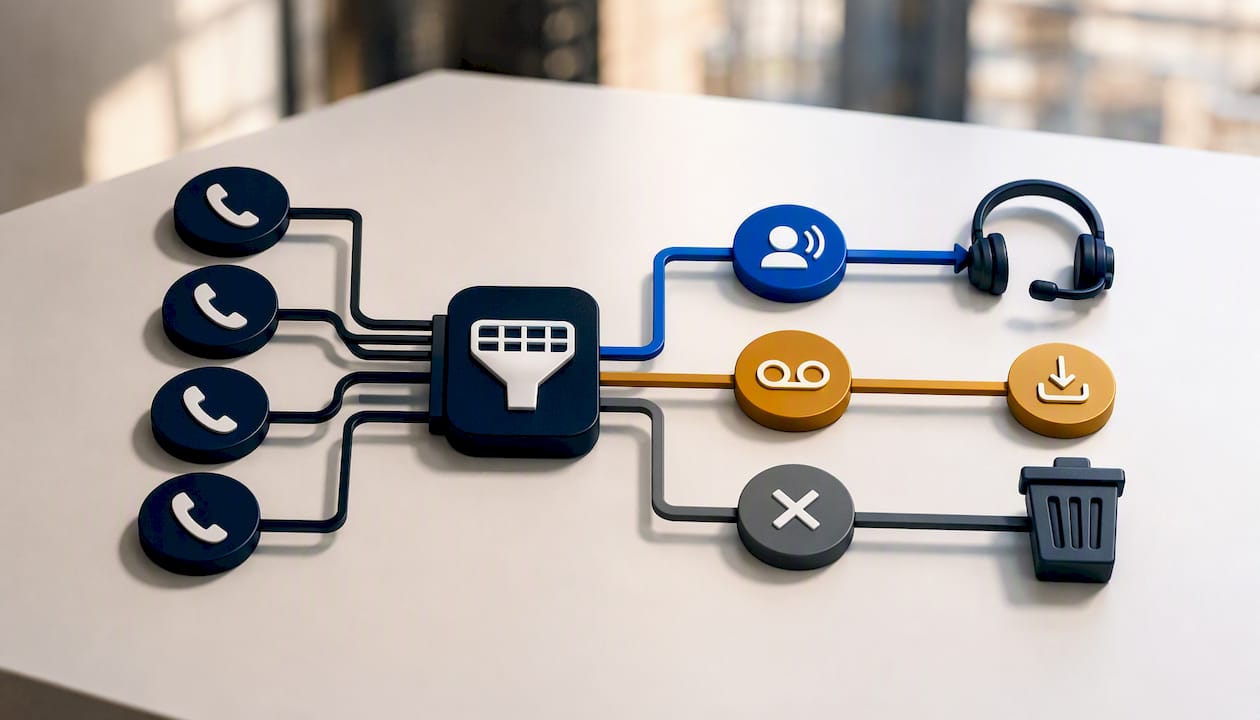
There’s a meaningful split between agent-driven triple-line setups and larger-scale parallel sessions. A three-line dialer, the most common consumer-facing version, dials three numbers per agent and gives that agent direct control over pacing and call review. Larger parallel sessions, often run centrally by an operations team, dial across many more lines simultaneously and require tighter automated governance since no single agent is watching each call in real time.
When a call connects, the dialer typically triggers an instant CRM pop, surfacing the contact’s history, notes, and prior disposition before the agent says a word. That sync matters more than most teams realize: a well-integrated CRM connection is what turns a fast connect into a productive conversation instead of an agent fumbling for context while the prospect is already talking.
What Multi Line Dialing Actually Improves
The core value proposition is simple: fewer seconds between conversations means more conversations per shift. Agents on parallel-line setups spend less time listening to rings, voicemail greetings, and busy tones, and more time actually talking to live prospects.
Here’s where that shows up operationally:
- Talk time uplift. Agents move through call lists faster because dead calls get filtered automatically instead of consuming agent attention.
- Higher connect rates. Dialing multiple numbers per attempt increases the odds at least one connects, especially valuable against lower-quality or older lead lists.
- Faster speed-to-lead. Teams can work fresh leads within minutes of intake instead of queuing them behind a single-line call sequence, a factor tied closely to conversion outcomes on new leads.
- Better throughput than power or preview dialing on large lists. Power and preview dialing wait on individual call outcomes before moving forward; multi-line dialing doesn’t wait, it dials ahead.
Pro Tip: Pair multi-line dialing with automated voicemail drops so agents never lose a beat between a filtered voicemail and the next live connect.
The compounding effect comes from automation stacked on top of the dialer itself. Auto-logged dispositions, AI call scoring, and workflow triggers turn each connect into a documented, actionable record instead of a manual note an agent has to type up between calls. Tracked against standard call center KPIs like connects per hour and average handle time, teams running well-configured multi-line campaigns consistently outperform single-line setups on volume metrics, though the gap narrows fast if list quality is poor.
Staying Compliant: TCPA, TSR, DNC, and Carrier Rules
This is where multi-line dialing gets teams into trouble, and it’s the part vendors gloss over. The Telemarketing Sales Rule governs disclosures, prerecorded message rules, and recordkeeping obligations that apply directly to automated dialing campaigns, and the FTC’s own compliance guidance spells out what counts as a prohibited practice. The Telephone Consumer Protection Act layers on additional restrictions around autodialed and prerecorded calls to wireless numbers, generally requiring prior express consent.
Practical rules of thumb that keep programs inside the lines:
- Scrub against the National DNC Registry and internal suppression lists before every campaign, not just once a month. Numbers move on and off lists constantly, and stale scrub cycles are a common source of violations.
- Track your call abandonment rate and keep it under the threshold regulators expect for outbound campaigns. High abandonment (calls answered by a live person but dropped because no agent was available) is one of the clearest enforcement triggers.
- Configure adaptive pacing so the system throttles line count automatically when answer rates rise or abandonment creeps up, rather than running fixed concurrency all day regardless of outcomes.
- Rotate caller ID numbers and maintain local presence dialing so your outbound numbers don’t accumulate spam complaints that trigger carrier-level blocking under the STIR/SHAKEN framework.
Pro Tip: Run a weekly caller ID reputation check. A single number flagged as spam by major carriers can silently tank your connect rate for days before anyone notices the pattern.
Complex situations, like state-specific DNC rules that go beyond the federal registry, or B2B exemptions that don’t apply as broadly as teams assume, are worth a conversation with legal counsel rather than a guess.
Where Multi Line Dialing Backfires
The same mechanics that create efficiency also create failure modes if left unmanaged. Dead air is the most immediate problem: a prospect picks up, hears silence for a beat while the system routes the call, and hangs up assuming it’s a robocall. That first impression is hard to recover from, and it happens more often at higher concurrency settings.
Number burnout is the slower, more expensive problem. Carriers track outbound volume and complaint patterns per number, and a dialer running high line counts on a small pool of caller IDs will get flagged as spam within days, not weeks.
Other tradeoffs to watch:
- Personalization suffers at high concurrency because agents have less time to review context before the call connects, which shows up as lower-quality conversations even when connect volume looks great.
- Bad list data multiplies every other risk. Dialing stale or mismatched numbers wastes lines, triggers more abandoned calls, and burns caller ID reputation faster than a clean list would.
- High-concurrency dialing isn’t right for every campaign. Complex or high-value conversations (large accounts, sensitive healthcare intake) usually perform better on lower-concurrency modes where agents have full context before the call connects.
Building a Multi Line Dialing Program That Scales
Start conservative. Pilot at two or three lines per agent, watch abandonment and answer rates daily, and only scale line count once those numbers hold steady for at least a couple of weeks.
- Set line count based on list quality and average handle time, not on how many lines the platform allows. A stale list needs fewer lines, not more, since bad data amplifies abandonment risk.
- Configure adaptive pacing rules that automatically reduce concurrency when abandonment climbs above your threshold, rather than relying on a manager to catch it manually.
- Run DNC and suppression scrubs on a fixed cadence, ideally before every campaign launch, and confirm your import files parse correctly so no records slip through unscrubbed. Even minor issues in how bulk data handles line breaks during parsing can cause DNC entries to be missed in large imports.
- Rotate caller IDs on a weekly schedule and monitor spam-labeling reports across major carriers.
- Equip agents with pop data, whisper messages, and scripts so the first five seconds of a connected call feel prepared, not scrambled. Give agents multi-line disposition fields rather than single-line note boxes: interface research shows that multi-line text fields consistently produce more detailed, useful notes than cramped single-line inputs.
Pro Tip: Treat your first 30-day as a controlled experiment, not a launch. Daily monitoring and weekly number rotation catch problems while they’re still cheap to fix.
Coaching cadence matters as much as the technical settings. Review call recordings weekly, correlate abandonment spikes with specific agents or time blocks, and adjust training before you adjust the dialer.
RevRing’s Approach to Multi Line Dialing
RevRing builds predictive and multi-line dialing directly into a platform that also handles compliance tooling, CRM connectivity, and workflow automation, so pacing decisions and list hygiene aren’t separate systems bolted together after the fact. Clients running regulated outbound programs in insurance, real estate, and healthcare use these controls to scale their agent count while keeping abandonment and DNC compliance inside acceptable limits. One documented example involves scaling agent count significantly without losing compliance discipline along the way. That kind of growth only holds up when pacing rules, caller ID management, and CRM data sync are built into the platform instead of managed manually.
Cloud Platforms vs. On-Premise Dialing Infrastructure
Cloud-based multi-line dialers dominate the market for good reason: they deploy faster, scale line count on demand, and push compliance updates centrally without touching agent hardware. Most modern outbound teams run cloud infrastructure because it removes the burden of maintaining physical telephony servers and lets operations teams add agents or lines within hours instead of weeks.
On-premise systems still show up in a handful of settings, usually large enterprises with existing telephony investments or strict data residency requirements that make cloud storage a harder sell. The tradeoff is real: on-premise gives more granular control over hardware and data location, but every scaling decision, every compliance rule change, and every caller ID adjustment requires internal IT work instead of a configuration change in a dashboard.
For most sales and call center operations, the deciding factor isn’t cost, it’s speed of iteration. A cloud platform lets an operations manager adjust pacing rules, add DNC suppression lists, or rotate caller IDs the same day a problem surfaces. On-premise systems typically require a change request and a maintenance window. Given how fast carrier reputation and regulatory guidance shift, that iteration speed increasingly decides which model wins for teams running active outbound campaigns rather than static, low-volume calling.
Telephony Integration: VoIP and SIP Trunking
Multi-line dialers run almost entirely over VoIP infrastructure now, and that’s not incidental. Traditional analog phone lines can’t support the simultaneous call sessions parallel dialing requires, while VoIP handles many concurrent sessions over a single internet connection at a fraction of the cost.
SIP trunking is the piece that makes this practical at scale. A SIP trunk connects your dialer platform to the public telephone network through a data connection rather than physical phone lines, and it’s what allows a cloud dialer to spin up dozens of simultaneous outbound sessions without provisioning new hardware. Bandwidth and call quality both depend on trunk capacity, so teams scaling line count need to confirm their SIP trunk provider can handle peak concurrent call volume without degrading audio quality.
Integration compatibility also matters for CRM and workforce tools sitting downstream of the dialer. A platform with native VoIP and SIP trunking support connects call events, dispositions, and recordings back to your CRM in real time, rather than requiring a batch sync that delays reporting by hours. That gap sounds minor until a manager is trying to coach an agent on a call that hasn’t shown up in the system yet.
Measuring Multi Line Dialing Performance
Standard call center metrics don’t tell the whole story with multi-line dialing, because the dialer’s efficiency shows up in ratios that single-line operations never had to track.
Connect rate (live answers divided by total dial attempts) matters more here than raw call volume, since a platform dialing aggressively but connecting poorly is burning numbers for nothing. Abandonment rate deserves daily tracking, not weekly, because it’s both a performance indicator and a compliance tripwire. Talk time per agent per hour shows whether the reduced idle time is translating into actual conversations rather than just more dial attempts.
Line utilization, the ratio of lines dialed to lines that resulted in an agent conversation, tells you whether your line count is set correctly for current list quality. A utilization rate that’s consistently low suggests you’re dialing more lines than your list and pacing settings can support without wasting capacity or risking abandonment violations.
Caller ID health metrics round out the picture: spam-flag rates per number, complaint volume by carrier, and average number lifespan before rotation becomes necessary. Teams that track these alongside traditional KPIs, rather than treating dialer performance and compliance risk as separate reports, catch problems before they show up as blocked numbers or regulatory complaints.
Who Benefits Most From Multi Line Dialing
High-volume outbound sales teams working large, relatively fresh lead lists see the clearest gains, since the dialer’s core advantage (filtering dead calls fast) compounds with every additional attempt. Insurance sales, where agents work high volumes of inbound-generated leads under tight response windows, is a strong fit. Real estate teams managing large prospect pools for cold outreach see similar benefits, particularly when paired with speed-to-lead workflows that route fresh leads to agents within minutes of intake.
Collections and accounts receivable teams also lean on multi-line dialing heavily, since list volume tends to be high and calls are typically short and transactional.
Healthcare intake and appointment reminder programs are a more cautious fit. The volume argument still applies, but compliance stakes are higher (HIPAA considerations layer on top of TCPA and TSR rules), so these programs generally run at lower concurrency with stricter agent review than a pure sales outbound campaign would use.
Legal and customer service outbound campaigns tend to fall in between: enough volume to benefit from parallel dialing, but conversations complex enough that many operations teams cap line count lower than they would for a straightforward sales list.
Multi Line Dialing vs. Preview, Progressive, and Predictive Modes
These four modes sit on a spectrum from agent control to system automation, and picking the right one depends more on conversation complexity than raw volume goals.
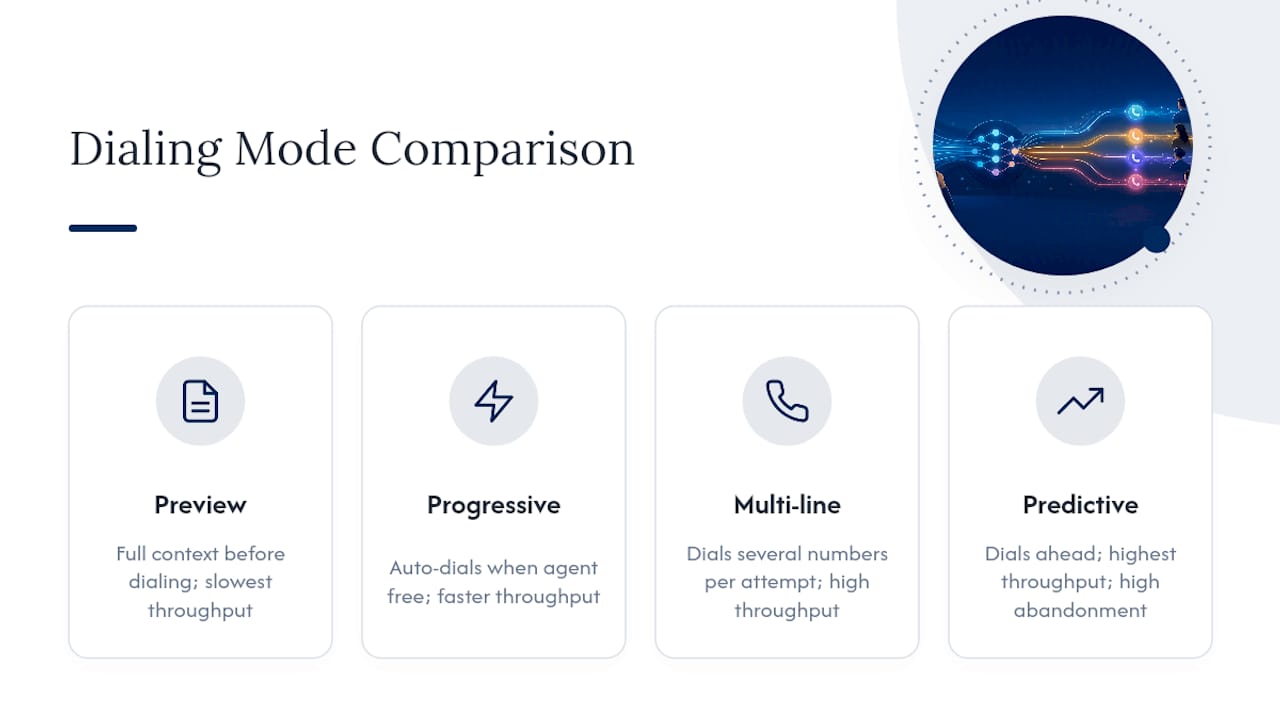
Preview dialing gives agents full context before a call even dials, showing account history and notes first. It’s slowest in volume terms but best for complex, high-value conversations where preparation matters more than speed.
Progressive dialing removes the preview step and dials one number automatically as soon as an agent becomes available, trading a little context time for meaningfully faster throughput.
Multi-line dialing goes further by dialing several numbers per attempt instead of one, prioritizing connect volume over per-call preparation. It sits above progressive dialing in raw throughput but below predictive dialing in concurrency scale.
Predictive dialing uses statistical models to dial ahead of agent availability across a large agent pool, aiming to have a connection ready the instant an agent frees up. It produces the highest volume of any mode but carries the highest abandonment risk if the prediction model miscalculates agent availability, which is exactly why abandonment-rate monitoring matters more on predictive and high-concurrency multi-line setups than on preview or progressive dialing.
Choosing Between Multi Line and Lower Concurrency
The decision comes down to list quality and compliance readiness, not ambition. If your data is clean, your DNC scrubs run on schedule, and abandonment stays low through a 30 day pilot, scale line count. If any of those three things are shaky, fix them before you add lines. Multi-line dialing amplifies whatever discipline, or lack of it, already exists in your operation.
— Marc
Run Multi Line Dialing Without the Guesswork
RevRing is built for the exact tradeoff this guide walks through: throughput without the compliance blind spots that trip up teams running multi-line campaigns on disconnected tools. The Predictive Dialer supports single-line, multi-line, and unlimited-line configurations with adaptive pacing built in. Line count adjusts automatically as answer rates and abandonment shift, not after a manager notices a problem in a weekly report.
Compliance tooling, including DNC management and TCPA safeguards, runs natively alongside caller ID rotation and CRM sync through ZinCRM, so pacing and legal risk get managed inside one system instead of three. Automated voicemail drops and AI call scoring through the AI & Automation suite round out the workflow so agents spend their time on live conversations, not administrative cleanup.
If you’re piloting multi-line dialing, a live demo is the fastest way to see pacing controls and number management in action before you commit list volume to it. Book a demo at RevRing and test your own pacing assumptions against real call data.
Where to Verify Compliance Details
- Review the FTC’s Telemarketing Sales Rule guidance for recordkeeping and disclosure requirements.
- Check the full legal text for prohibited practices.
- Consult legal counsel for state-specific DNC rules or edge-case exemptions.
Sources
- Complying with the Telemarketing Sales Rule
- Telemarketing Sales Rule (legal text)
- Regular expression options (Multiline mode) — Microsoft Learn
FAQ
What Is the Best Multi Line Dialer?
The best option depends on your list volume and compliance posture, but platforms that combine multi-line dialing with built-in TCPA and DNC compliance tooling, like RevRing’s predictive dialer, reduce the operational risk that comes with running a separate compliance stack.
Is an Autodialer Illegal?
Autodialers aren’t illegal outright, but the Telemarketing Sales Rule and TCPA impose strict consent, disclosure, and abandonment requirements that make unmanaged autodialing a significant legal risk.
What Is a 3-Line Dialer?
A three-line dialer, also called a triple-line dialer, is a multi-line dialing setup that calls three numbers per agent simultaneously and connects the first one that answers.
How Do You Make Multiple Phone Calls at Once?
Multiple simultaneous calls require a multi-line or predictive dialer platform running over VoIP with SIP trunking, since traditional phone lines can’t support concurrent outbound sessions from a single agent line.