What Ping Post Leads Are and Why Speed Beats the Highest Bid

Ping-post is a millisecond auction: the seller sends buyers a partial lead record, the “ping,” and the winning bidder receives the full contact record, the “post.” Speed, filters, and your track record with a source usually beat the highest raw bid, because platforms increasingly weight bids by buyer performance rather than dollar amount alone.
If you’re buying ping post leads for the first time this quarter, don’t start by chasing the top of the bid stack. Start here instead:
- Turn on shared-preview testing before you commit to exclusive buys.
- Connect your posts directly to your dialer or CRM through a webhook, not a manual export.
- Build bid rules from your own close data, not the vendor’s sales deck.
Get those three things running and you’ll know within days whether a source is worth scaling.
Key Takeaways
Ping-post leads reward buyers who filter on real close data and integrate fast, not buyers who simply outbid the field.
| Point | Details |
|---|---|
| Ping vs. post | The ping sends partial, non-PII data; the post delivers full contact details to the winning bidder. |
| Bid on your own data | Set bid rules from segment-level close rates, not vendor recommendations. |
| Speed-to-lead is controllable | Route posts through webhook to API to dialer with no manual steps to hit fast contact times. |
| Pilot before you scale | Start with shared previews, track accept and return rates, and confirm cost per closed deal before exclusive buys. |
| Revring integrates the workflow | Revring connects ping-post routing, predictive dialing, and ZinCRM so posts trigger automated outreach immediately. |
Table of Contents
- How Ping Post Leads Actually Work
- The Real Upside and the Real Risk of Ping-Post Buying
- What Bid Rules Should You Actually Set?
- How Fast Does Your CRM Need to Respond to a Post?
- What Pricing Format and Metrics Actually Matter?
- How Do You Pilot a New Ping-Post Source Safely?
- How Revring Solves the Integration and Speed Problem
- Why Most Ping-Post Advice Gets the Priorities Backward
- Get Ping-Post Leads Routed and Dialed Without Building It Yourself
- Frequently Asked Questions About Ping Post Leads
- Sources
How Ping Post Leads Actually Work
The mechanics are simple once you see the sequence. A consumer fills out a form, insurance quote, mortgage inquiry, home repair estimate, and the seller’s system immediately pings a pool of registered buyers with a stripped-down record: zip code, project type, intent signals, sometimes a credit tier. No name, no phone number, no email. That’s the non-PII rule that keeps the ping stage compliant.
- Ping fires. Buyers receive the partial record and must respond in milliseconds with a bid.
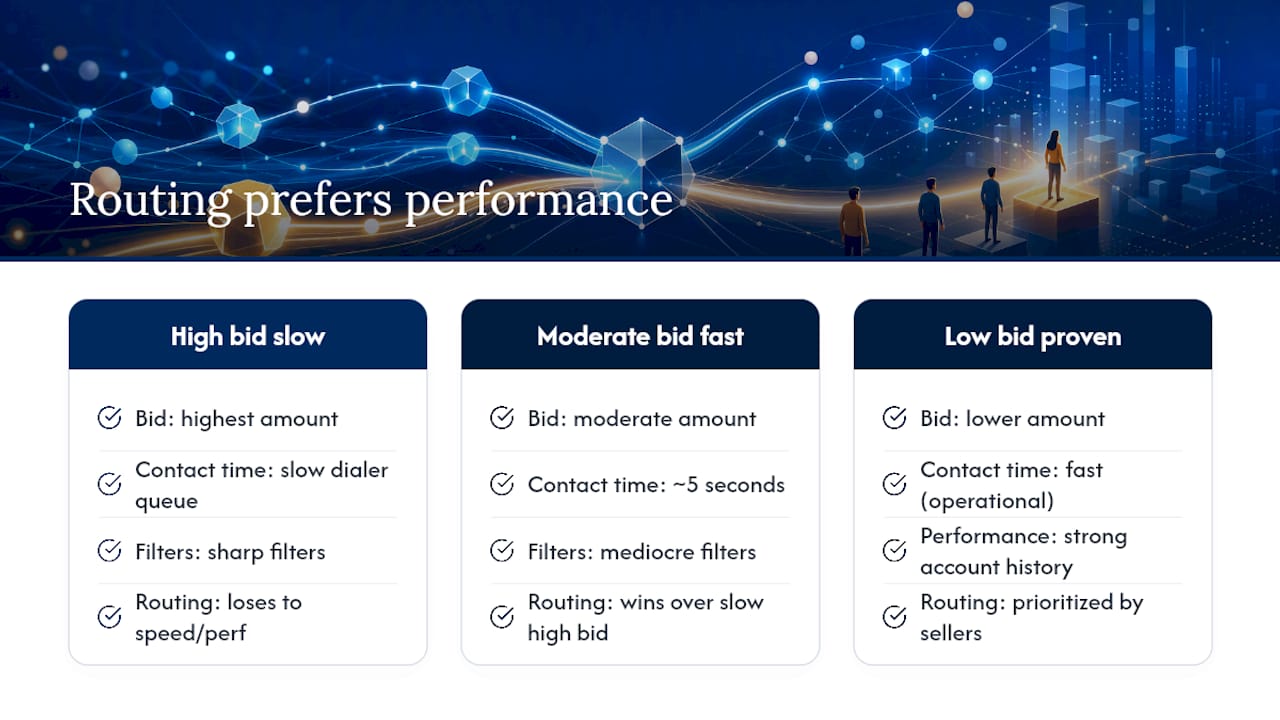
- Bids get evaluated. The seller’s platform ranks offers, and many platforms don’t simply award the post to whoever bid highest. Performance history and relationship value often carry more weight than the raw number.
- Post delivers. The winning buyer gets the full contact record, name, phone, email, and takes ownership of the lead.
- Ping tree cascades if needed. If the top buyer declines or the ping goes unanswered, the offer moves to the next tier, either sequentially (one buyer at a time) or simultaneously (multiple buyers see it at once).
Sellers configure the tree’s order and floor prices, which means availability isn’t random. A buyer sitting at tier two only sees leads the tier-one buyer passed on or couldn’t afford. That’s worth knowing before you assume a “low volume” source is simply small. It might just mean you’re stuck low in someone else’s tree.
The performance-weighting piece is the part most new buyers miss entirely. A seller who has watched your account convert reliably for six months may route you leads ahead of a higher bidder with a spotty payment or return history.
The Real Upside and the Real Risk of Ping-Post Buying
Done right, ping-post gives you dynamic price discovery on live intent, not stale lists. You bid on a lead the moment it exists, filter it against your own criteria, and walk away from anything that doesn’t fit. Sellers benefit too: instead of committing to one exclusive buyer at a fixed price, they let the market set it in real time.
The risks sit on the other side of that same speed:
- Low-converting pings. A ping that matches your filters on paper can still be a dead-end lead once you actually call it.
- Returns and credits eat margin. Every return policy dispute costs staff time even when the credit gets approved.
- Compliance exposure. If your intake workflow accidentally logs or stores ping-stage data alongside post data in a way that blurs consent trails, you’ve created a TCPA problem you didn’t need.
- Operational drag. Slow contact, misrouted leads, and ping fields that don’t map to your ideal customer profile all quietly bleed spend.
Some corners of the industry have leaned on ping-post to move low-quality, high-pressure offers, and that reputation risk is real enough that buyer diligence matters before you sign with any new source.
Pro Tip: Run a “ghost audit” on any new source for the first two weeks: log every ping you win but never actually contact within your SLA. If that number climbs past single digits, the problem is your routing, not the lead quality.
What Bid Rules Should You Actually Set?
Most buyers set bids based on gut feel or whatever a rep recommends. Neither works once you’re spending real budget. Build your rules from your own numbers instead.
- Pull your close data by segment. Break out conversion rate by zip code, project type, and lead age. You’ll usually find you close 3 to 4 times better in some segments than others.
- Bid up where you win, pass where you don’t. If a zip code has converted at half your average rate for three months straight, stop bidding on it entirely rather than lowering the bid slightly.
- Request performance weighting from your vendor. Ask directly whether the platform weights bids by your account history. Sellers do reward buyers who’ve built a reliable track record, and asking for that weighting explicitly can lower your effective cost per win.
- Set exclusion filters mapped to your ICP. Age range, income tier, prior-contact flags, whatever disqualifies a lead before you ever pay for it.
- Pilot with shared previews first. Track accept rate and return rate for at least two to three weeks before moving to exclusive buys.
Predictive scoring at the ping stage lets you skip low-probability prospects before any money changes hands, which is the single highest-leverage filter most buyers underuse. Instead of bidding on every ping that technically matches your criteria, score it first and let the model tell you which ones are worth a bid at all.
How Fast Does Your CRM Need to Respond to a Post?
The lead doesn’t care how good your close rate is if nobody calls for twenty minutes. Speed-to-lead is the single most controllable variable in this entire process, and it’s also the one buyers most often leave half-configured.
The delivery path that minimizes latency runs webhook to API to dialer or CRM, with no manual step in between. If someone on your team is copying lead data from an email into a spreadsheet before it reaches a dialer, you’ve already lost the window that matters.
- Aim for outreach within seconds of the post landing, not minutes.
- Track actual contact time against your conversion rate. The gap between fast and slow contact is usually where most of your lost revenue hides, not in lead quality itself.
- Watch for queued posts and webhook retries during onboarding. These are the quiet failure points that make a source look worse than it is.
- Build a fallback route (a second dialer queue or manual alert) for when the primary integration stalls.
Pro Tip: Simulate a burst of 50 pings hitting your system in under a minute before you go live with a new source. If your CRM or dialer chokes on that volume in testing, it will choke on it in production.
What Pricing Format and Metrics Actually Matter?
Ping-post pricing isn’t one number. Sellers typically offer shared preview, exclusive post, and live transfer formats, and each carries a different price and a different conversion ceiling. Shared preview costs less but splits the lead with competitors. Exclusive post costs more but you own it outright. Live transfer costs the most and hands you a consumer already on the phone.
Cost per lead is the wrong number to optimize first. These are the ones that actually predict profit:
- Accept rate, how often you actually win the pings you bid on.
- Return or credit rate, your real quality-control signal.
- Contact rate, tied directly to your speed-to-lead performance.
- Conversion rate, leads that become customers.
- Cost per closed deal, which you get by dividing total spend on a source by total closed deals from that source.
That last number is your bid ceiling. If your cost per closed deal from a source exceeds your acceptable customer acquisition cost, no bid strategy fixes it. You drop the source.
How Do You Pilot a New Ping-Post Source Safely?
- Start with shared previews. Run a fixed sample, at least two to three weeks or a set volume, before touching exclusive buys.
- Monitor four numbers daily. Contact rate, accept rate, conversion rate, and running cost per closed deal.
- Lock down contract terms early. Get territory exclusivity, return policy, refund triggers, and data-handling terms in writing before scaling spend.
- Set a scale threshold. Define the exact metric level, for example a target cost per closed deal, that triggers moving from pilot to full ramp.
Buyers who commit to shared previews before jumping to exclusive ownership consistently avoid the worst surprises new sources tend to produce.
How Revring Solves the Integration and Speed Problem
Most of the failures covered above, slow contact, mismatched routing, compliance gaps, come down to disconnected tools. Revring’s platform ties ping-post routing, predictive dialing, and ZinCRM together so a post triggers outreach automatically instead of waiting on someone to notice it.
- Real-time smart routing (round robin, skill, geo, ping-post) built into the core platform.
- A lead marketplace with shared preview and exclusive formats already integrated with delivery infrastructure.
- Compliance tooling covering TCPA and DNC built into the same workflow, not bolted on after.
Clients using Revring’s playbooks have scaled from 12 to 180 agents while keeping compliance workflows intact, the kind of scale that exposes every routing weakness a smaller operation never notices.
Why Most Ping-Post Advice Gets the Priorities Backward
Most guides on this topic treat ping-post like a bidding contest: bid smart, win more auctions, done. That framing misses what actually separates profitable buyers from the ones who churn through sources every quarter. The winning move isn’t outbidding anyone. It’s building a performance record precise enough that sellers route you leads ahead of buyers with deeper pockets.
The conventional advice also underrates how much speed-to-lead infrastructure matters compared to the bid itself. A buyer with mediocre filters but a five-second contact time will consistently beat a buyer with sharp filters and a slow dialer queue. Nobody wants to hear that the fix is operational, not strategic, but the metrics don’t lie.
If you take one thing from this, prioritize the pilot phase over the pitch. Every vendor will tell you their leads convert. Shared previews and a two-week test tell you the truth. Set your scale threshold before you start, not after you’ve already spent the budget you meant to protect.
Get Ping-Post Leads Routed and Dialed Without Building It Yourself
Buying ping post leads well takes more than a good bid strategy. It takes infrastructure: routing that respects your filters, a dialer fast enough to hit your contact-time targets, and a CRM that doesn’t lose the thread between the post and the close. Revring is built specifically for that gap, connecting smart lead routing, predictive dialing, and compliance tooling into one system instead of forcing you to stitch together a webhook here and a spreadsheet there.
For teams in insurance, real estate, or home services buying leads at volume, that means less time firefighting integration failures and more time actually working the leads you paid for. If you’re piloting a new ping-post source right now, check Revring’s lead generation industry page to see how the routing and dialer setup maps to your vertical, then schedule a live demo to walk through your specific bid rules and SLA targets before you commit next quarter’s budget.
Frequently Asked Questions About Ping Post Leads
What is ping post in simple terms? Ping post is a real-time auction where a seller sends buyers a stripped-down lead record, the ping, and the highest-weighted bidder wins the full contact details, the post, usually within milliseconds.
Is ping-post the same as a lead marketplace? Ping-post is a mechanic used inside many lead marketplaces, not a separate product. A lead marketplace can offer ping-post routing alongside static lead lists, live transfers, and exclusive sales.
Why did I win a ping-post auction with a lower bid? Many platforms weight bids by your account’s performance history and relationship value, not just the dollar amount, so a proven buyer can outrank a higher bid from a new account.
How fast should I respond to a ping-post lead? Aim for outreach within seconds of receiving the post. Delays of even a few minutes measurably reduce contact and conversion rates.
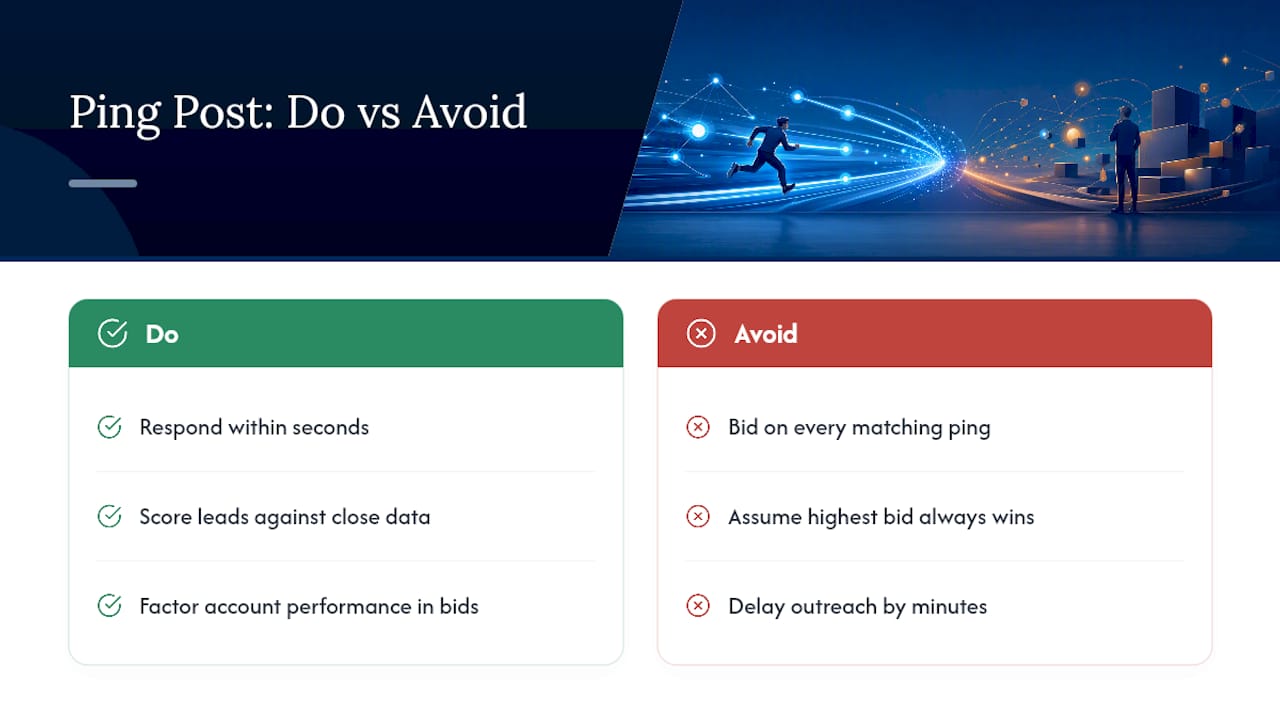
What’s the biggest mistake new ping-post buyers make? Bidding on every ping that technically matches their filters instead of scoring leads against their own close data first, then wondering why cost per closed deal keeps climbing.